Git & GitHub: What Looked Simple Until It Wasn’t

This week was about Git and GitHub. I’ve used them before, but mostly in a surface-level way. I knew the basic flow like make changes, commit, push. Things usually worked, so I never questioned why they worked.
This time, the tasks forced me to slow down and actually look at what was happening.
Starting Simple: Things That Felt Easy
At the beginning, most of the work felt familiar.
forked a repository
cloned it locally
created a new folder
initialized Git
made a commit and pushed it
None of this was hard. These are the things you learn first, and honestly, they feel mechanical after a while. You don’t think much ,you just do them.
At this stage, Git feels very forgiving. If something goes wrong, you try again and it usually works.
Where Confusion Started: Git vs GitHub
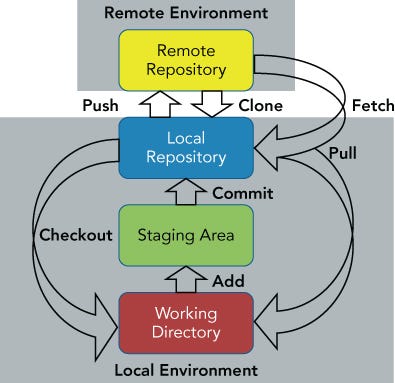
The confusion started when I had to deal with remotes and authentication.
That’s when it became clear that I had been mixing Git and GitHub in my head.
Git was doing its job locally without any issues.
GitHub was where things got strict like authentication, permissions, syncing.
Setting up PATs and later switching to SSH made this difference obvious. Nothing about my local Git workflow changed, but the way I connected to GitHub did. That helped me finally separate the two properly.
Branching Felt Different This Time
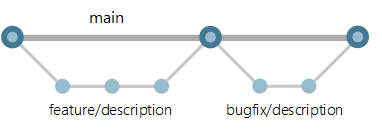
I had created branches before, but this time I actually worked with them properly.
- I have created a feature branch
made changes there
pushed it
merged it through a Pull Request instead of directly
This made branching feel less like a “best practice” and more like a normal way of working. It also made me realize how risky it is to work directly on the main branch, especially when changes start piling up.
Undoing Things Was the Hard Part
The hardest and most uncomfortable part was undoing changes.
Trying out reset and revert showed me that:
some undo actions are safe
some can mess up history badly
This was the first time Git actually felt dangerous. One wrong choice can remove commits or rewrite history, and Git doesn’t really warn you. That’s when I understood why teams are strict about how these commands are used.
Temporary Work and Quick Fixes
Stashing and cherry-picking were interesting because they feel like shortcuts.
They’re useful when:
you’re in the middle of something
you need to switch context
you only want one specific change
But they also made me realize how easy it is to create confusion later if you rely on them too much. These tools solve short-term problems but can cause long-term mess if used carelessly.
Rebasing Changed How I Look at History
Rebasing was the point where everything connected.
It showed me clearly that Git history is not fixed. You can clean it, reshape it, and also break it. That’s powerful, but also risky, especially when more than one person is involved.
After this, Git stopped feeling like a simple tool and started feeling like shared infrastructure.
Branching Strategies Made It Feel Real

Reading about and trying different branching strategies made things feel closer to real-world work.
It became clear that:
there is no single best workflow
every strategy has trade-offs
simpler workflows are usually easier to maintain
Branching strategies aren’t really about Git they’re about how teams work together.
Ending Thoughts
This week didn’t teach me a lot of new commands. It taught me to be more careful.
I still use the same basic Git flow, but now I think more before doing things and especially when it comes to undoing changes or touching shared branches.
Git didn’t suddenly become hard.
I just stopped using it blindly.
I’m dropping my GitHub Repo link , feel free to checkout the tasks that i have worked on
Repo: https://github.com/Harish1685/90DaysOfDevOps.git
Branch: gitandgithub-week4


